
Find or Change My Windows Product Key |
 |
| by Oscar Sodani | |
| December 12, 2005 | |
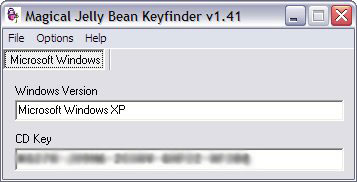
 Oscar Sodani is a founder of Help2Go and owner of Help2Go Networks, an IT consulting firm in the Washington D.C. area. Oscar holds the CISSP certification as well as industry certifications from Microsoft, Cisco and Novell. When you install Windows (whether it's Windows 98, Windows ME, Windows 2000, or Windows XP), you are asked to type in a long, convoluted product key. This is to ensure that you did in fact purchase that copy of Windows you are installing. The product key is usually printed on a sheet that comes with your new PC, but it is very easy to misplace. If you ever need to reinstall Windows, then you will absolutely need that product key again. Luckily, a free utility can help retrieve your Windows product key from your PC. The first step is to download the Magical Jelly Bean Keyfinder. We've tested this utility: this software is completely free, and doesn't contain any nasties like spyware or viruses. Once you've downloaded the file, unzip the contents to find the "keyfinder.exe" file. Simply double-click this file to run the program. You'll see a screen that looks like this:
The second line contains your Windows product key. I've blocked mine out so people can't steal it. Write it down on a piece of paper and keep it handy - you may need it someday if you want to reinstall Windows. The utility also allows you to change the Windows product key if you need to. Just click on the Options Menu and choose Change Key. Then click on the File menu and choose Save. Have a question? Need help? Get free, friendly person-to-person help with your computer questions or spyware questions in our help forums! |